

In this article, I’ll explain how to display the (ACF) Advance Custom Fields display into page using the shortcode and copy-to-clipboard method. ACF allows users to add custom fields to their content, providing a flexible way to display additional information on pages, posts, and custom post types. These custom fields can include various types of data, such as text, images, links, and more. Using shortcodes and other features, users can then integrate and display this custom data on their WordPress website in a more dynamic and customizable way.
2 steps for Advance Custom Fields Display into Page Using Shortcode and Copy to clipboard script
- Open your theme’s
functions.phpfile. - Add the following code: (*This is an example of my project you can modify the code as per your need)
// functions.php or your custom plugin file

function bitdefender_user_card_display_shortcode() {
    ob_start(); // Start output buffering

    // Get ACF values
    $email_address = get_field('email_address');
    $password = get_field('password');
    $bitdefender_account_email = get_field('bitdefender_account_email');
    $bitdefender_account_password = get_field('bitdefender_account_password');
    $activation_date = get_field('activation_date');
    $bitdefender_invitation_link = get_field('bitdefender_invitation_link');


	// Assuming $activation_date is in the format 'd/m/Y'
    $activation_date_obj = DateTime::createFromFormat('d/m/Y', $activation_date);

	if ($activation_date_obj) {
		// Add 30 days to the activation date
		$expiry_date_obj = clone $activation_date_obj;
		$expiry_date_obj->modify('+30 days');

		// Get today's date
		$today_date_obj = new DateTime();

		// Calculate the difference in days
		$days_left = $today_date_obj->diff($expiry_date_obj)->days;
	}


    // Output the HTML structure
    ?>

   <style>
    .card_bitdefender {
        max-width: auto;
        margin: 20px auto;
        padding: 20px;
        background-color: #fff;
        border-radius: 8px;
        box-shadow: 0 0 10px rgba(0, 0, 0, 0.1);
    }

    .row_bitdefender {
        display: flex;
        flex-direction: column; /* Stack items vertically */
        margin-bottom: 10px;
    }

    .title_bitdefender {
        font-size: 18px;
        margin-bottom: 5px;
    }

    .value_bitdefender {
        padding: 10px;
        border: 1px solid #ddd;
        border-radius: 4px;
        cursor: pointer;
        margin-bottom: 5px;
    }

    .value_bitdefender:hover {
        background-color: #f2f2f2;
    }

    .copy-message_bitdefender {
        display: none;
        color: green;
        font-size: 18px;
    }
</style>

<div class="card_bitdefender">

    <div class="row_bitdefender">
        <div class="title_bitdefender">WebMail Account</div>Email
        <div class="value_bitdefender" id="copyEmail"><?php echo $email_address; ?></div>Password
        <div class="value_bitdefender" id="copyPassword"><?php echo $password; ?></div>
    </div>
	<br>
    <div class="row_bitdefender">
        <div class="title_bitdefender">Bitdefender Account</div>Email
        <div class="value_bitdefender" id="copyBitdefenderEmail"><?php echo $bitdefender_account_email; ?></div>Password
        <div class="value_bitdefender" id="copyBitdefenderPassword"><?php echo $bitdefender_account_password; ?></div>
    </div>
	<br>
    <div class="row_bitdefender">
        <div class="title_bitdefender">Activation Date (Days Left: <?php echo $days_left; ?>)</div>
        <div class="value_bitdefender" id="copyActivationDate"><?php echo $activation_date; ?></div>
        <div class="title_bitdefender">Invitation Link</div>
        <div class="value_bitdefender" id="copyInvitationLink"><?php echo $bitdefender_invitation_link; ?></div>
    </div>

</div>

<script>

	//function for copy to clipboard
    function copyToClipboard(value, messageElement) {
        const tempInput = document.createElement('textarea');
        tempInput.value = value;
        document.body.appendChild(tempInput);
        tempInput.select();
        document.execCommand('copy');
        document.body.removeChild(tempInput);
        messageElement.innerHTML = "<span style='color:green;'><i class='fas fa-check'></i> copied </span>";
		console.log(messageElement);
        setTimeout(() => {
            messageElement.innerText= value;
        }, 2000);
    }

    document.getElementById('copyEmail').addEventListener('click', () => {
        copyToClipboard('<?php echo $email_address; ?>', document.getElementById('copyEmail'));
    });

    document.getElementById('copyPassword').addEventListener('click', () => {
        copyToClipboard('<?php echo $password; ?>', document.getElementById('copyPassword'));
    });

    document.getElementById('copyBitdefenderEmail').addEventListener('click', () => {
        copyToClipboard('<?php echo $bitdefender_account_email; ?>', document.getElementById('copyBitdefenderEmail'));
    });

    document.getElementById('copyBitdefenderPassword').addEventListener('click', () => {
        copyToClipboard('<?php echo $bitdefender_account_password; ?>', document.getElementById('copyBitdefenderPassword'));
    });

    document.getElementById('copyInvitationLink').addEventListener('click', () => {
        copyToClipboard('<?php echo $bitdefender_invitation_link; ?>', document.getElementById('copyInvitationLink'));
    });

    // Repeat the above process for other fields...

</script>

    <?php

    return ob_get_clean(); // End buffering and return the output
}
add_shortcode('bitdefender_user_card', 'bitdefender_user_card_display_shortcode');
To display the return value on your page you have to use this shortcode [bitdefender_user_card].
Output:
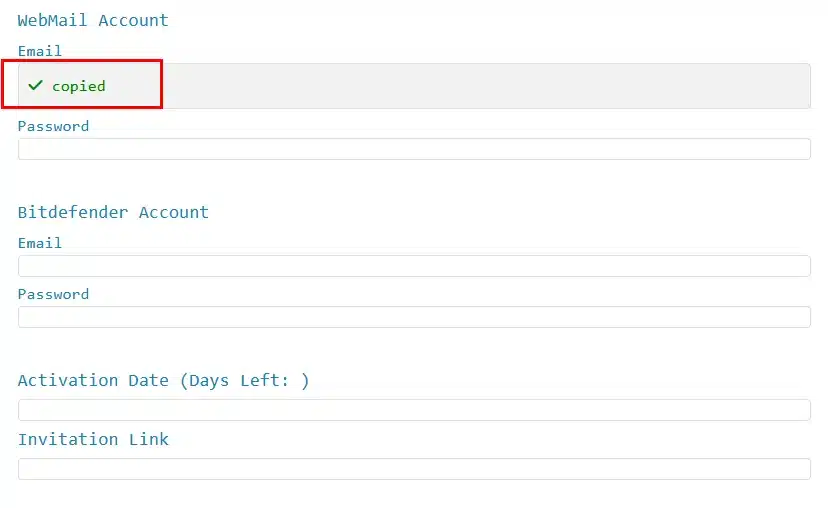
Hope you will find this code helpful to Display the Advance Custom Fields on the WordPress page using the shortcode and click method help you to add any of the clicked elements into the clipboard. If you are facing any error drop the comment below. Our professional team will give you the solution in a short turn.




I’m gone to convey my little brother, that he should also pay a quick visit this weblog
on regular basis to take updated from newest news.
I got this website from my friend who shared with me on the
topic of this site and at the moment this time I am browsing this website and reading very informative content
at this time.
I have been surfing online more than 4 hours today, yet I never found any interesting article like yours.
It’s pretty worth enough for me. In my opinion, if all web owners and bloggers made good content as you did, the web will be a lot more useful than ever before.
Everything said was actually very logical. However, think on this, what
if you composed a catchier post title? I ain’t suggesting your content is not solid, but what if you
added a post title that grabbed folk’s attention? I mean Advance Custom Fields Display
into Page Using Shortcode and Copy to clipboard script (Solved) – SKFREELANCERS is kinda
plain. You ought to look at Yahoo’s home page and
see how they write news titles to get people to open the links.
You might try adding a video or a pic or two to grab readers
interested about what you’ve got to say. In my opinion,
it would bring your posts a little bit more interesting.
Hello there I am so glad I found your blog page, I really
found you by mistake, while I was researching on Askjeeve
for something else, Regardless I am here now and
would just like to say kudos for a marvelous post and a all round thrilling blog (I
also love the theme/design), I don’t have time to read through it all at the moment
but I have book-marked it and also added your RSS feeds, so when I have time I will
be back to read much more, Please do keep up the excellent b.