If you’ve built your business website on WordPress — great choice. But here’s something most new WordPress users don’t realize: a fresh WordPress installation is just the foundation. The real power comes from the plugins you add on top of it.
Plugins are like apps for your WordPress site. They add features, improve performance, boost your SEO, protect your site from hackers, and help you convert visitors into customers — without writing a single line of code.
The problem? There are over 60,000 plugins in the WordPress plugin directory. How do you know which ones your small business actually needs?
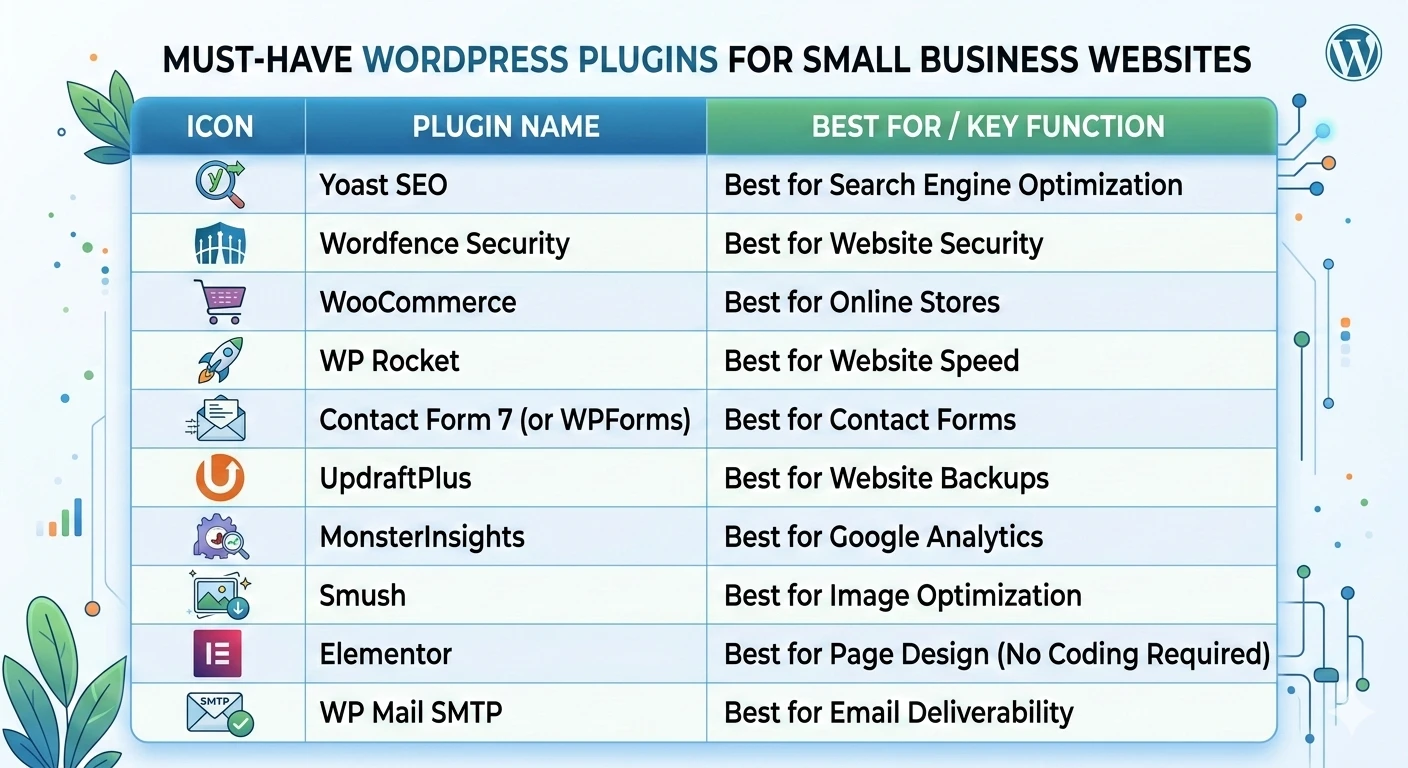
We’ve done the work for you. Here are the 10 best WordPress plugins for small business websites in 2025 — tested, trusted, and used by professionals worldwide.
What to Look for in a WordPress Plugin
Before we dive in, here’s a quick checklist for evaluating any WordPress plugin:
- Active installations — More than 100,000 active users is a good sign
- Regular updates — The plugin should be updated frequently (within the last 30–60 days)
- Strong ratings — Look for 4+ stars with a high number of reviews
- Compatibility — Make sure it works with your current WordPress version
- Support — Active support forums or dedicated customer service
Now, let’s get into the list.
1. Yoast SEO — Best for Search Engine Optimization
Why you need it: If you want your website to show up on Google, Yoast SEO is non-negotiable. It’s the most popular SEO plugin in the world — and for good reason.
Yoast walks you through optimizing every single page and blog post on your site. It analyzes your content for keyword usage, readability, meta descriptions, title tags, and more. It even generates your XML sitemap automatically and submits it to Google.
Key features:
- Real-time SEO and readability analysis
- Automatic XML sitemap generation
- Meta title and description editor
- Schema markup (helps Google understand your content)
- Breadcrumb navigation support
Price: Free (Premium version available at $99/year) Best for: Every small business website, no exceptions.
2. Wordfence Security — Best for Website Security
Why you need it: WordPress sites are hacked over 90,000 times per day globally. If your website goes down or gets compromised, you lose customers, revenue, and trust. Wordfence is the most widely used WordPress security plugin — and it’s incredibly effective.
It includes a firewall that blocks malicious traffic before it reaches your site, plus a malware scanner that checks your files, themes, and plugins for suspicious code.
Key features:
- Web Application Firewall (WAF)
- Malware scanner and cleaner
- Login security with two-factor authentication
- Real-time traffic monitoring
- Brute force attack protection
Price: Free (Premium at $119/year) Best for: Any business that can’t afford downtime or a security breach.
3. WooCommerce — Best for Online Stores
Why you need it: If you sell products or services online, WooCommerce turns your WordPress site into a fully functional e-commerce store. It powers over 28% of all online stores in the world — more than Shopify and Magento combined.
WooCommerce handles everything from product listings to checkout, payment processing, order management, and shipping. And because it’s built on WordPress, you have complete control over your store’s design and functionality.
Key features:
- Unlimited products and product variations
- Multiple payment gateways (PayPal, Stripe, credit cards)
- Inventory and order management
- Shipping rate calculations
- Hundreds of extensions available
Price: Free (extensions sold separately) Best for: Small businesses selling physical products, digital downloads, or services online.
4. WP Rocket — Best for Website Speed
Why you need it: Website speed is critical. Google uses page speed as a ranking factor, and studies show that 53% of visitors abandon a website that takes more than 3 seconds to load. WP Rocket is the gold standard for WordPress speed optimization.
Unlike free caching plugins that require technical configuration, WP Rocket works out of the box and delivers dramatic speed improvements immediately after activation.
Key features:
- Page caching for instant load times
- Image lazy loading
- CSS and JavaScript minification
- Database optimization
- CDN integration support
Price: $59/year (single site) Best for: Any business website that wants faster load times and better Google rankings.
5. Contact Form 7 (or WPForms) — Best for Contact Forms
Why you need it: Every business website needs a way for visitors to reach out. Contact Form 7 is the most installed WordPress plugin of all time — simple, reliable, and free.
If you want a more beginner-friendly option with a drag-and-drop builder, WPForms is the premium alternative that many professionals prefer.
Key features (WPForms):
- Drag-and-drop form builder
- Pre-built form templates
- Email notifications and confirmations
- Spam protection with reCAPTCHA
- Payment form integration (Stripe, PayPal)
Price: Contact Form 7 is free. WPForms starts at $49.50/year. Best for: Any website that needs lead generation, contact, or inquiry forms.
6. UpdraftPlus — Best for Website Backups
Why you need it: Imagine waking up one morning to find your website has crashed, been hacked, or accidentally deleted. Without a backup, everything is gone. UpdraftPlus is the most trusted WordPress backup plugin, with over 3 million active installations.
It automatically backs up your entire website — files, database, themes, plugins — and stores copies in the cloud (Google Drive, Dropbox, Amazon S3, and more).
Key features:
- Automated scheduled backups
- One-click restore
- Cloud storage integration (Google Drive, Dropbox, etc.)
- Backup before updates (so you can roll back safely)
- Incremental backups (Premium)
Price: Free (Premium at $70/year) Best for: Every single WordPress website. Seriously — no excuses for not having backups.
7. MonsterInsights — Best for Google Analytics
Why you need it: You can’t grow what you can’t measure. MonsterInsights connects your WordPress site to Google Analytics and displays all your important data directly inside your WordPress dashboard — no need to log into Google Analytics separately.
You’ll see exactly where your visitors are coming from, which pages they’re reading, how long they stay, and what actions they take.
Key features:
- Google Analytics integration without coding
- Real-time stats inside WordPress dashboard
- E-commerce tracking (WooCommerce)
- Form conversion tracking
- Page-level performance reports
Price: Free (Pro version starts at $99.50/year) Best for: Business owners who want to understand their website traffic and make data-driven decisions.
8. Smush — Best for Image Optimization
Why you need it: Large, unoptimized images are one of the biggest causes of slow WordPress websites. Smush automatically compresses and resizes every image you upload — reducing file sizes by up to 80% without any visible quality loss.
Faster images = faster website = better SEO rankings = happier visitors.
Key features:
- Automatic image compression on upload
- Bulk smush (optimize existing images)
- Lazy loading for images
- WebP conversion (faster modern image format)
- CDN delivery (Pro version)
Price: Free (Pro at $7.50/month) Best for: Any WordPress site with lots of images — especially photographers, restaurants, retailers, and portfolio sites.
9. Elementor — Best for Page Design (No Coding Required)
Why you need it: Elementor is the most popular drag-and-drop page builder for WordPress. It lets you design beautiful, professional-looking pages visually — without touching a single line of code.
With Elementor, you can build landing pages, service pages, homepages, and more exactly the way you want them to look — from scratch or using one of their hundreds of pre-built templates.
Key features:
- Live drag-and-drop visual editor
- 100+ pre-designed page templates
- Mobile responsive design controls
- WooCommerce builder
- Pop-up and form builder
Price: Free (Pro at $59/year) Best for: Small business owners who want full control over their website design without hiring a developer for every change.
10. WP Mail SMTP — Best for Email Deliverability
Why you need it: By default, WordPress uses a basic PHP mail function to send emails — and most of those emails end up in spam folders. WP Mail SMTP fixes this by routing your website’s emails through a proper mail server (Gmail, SendGrid, Mailgun, etc.).
This means your contact form submissions, order confirmations, and customer emails actually get delivered — and land in the inbox, not spam.
Key features:
- SMTP email configuration
- Gmail, Outlook, SendGrid, Mailgun integration
- Email logging (see every email sent from your site)
- Email delivery failure alerts
- White-glove setup (Pro)
Price: Free (Pro at $49/year) Best for: Any WordPress site that sends emails to customers or leads — which is basically every business website.
Quick Summary: The Essential Plugin Stack
Here’s the complete recommended plugin stack for a small business WordPress website:
| PLUGIN | PURPOSE | COST |
|---|---|---|
| Yoast SEO | Search engine optimization | Free / $99/yr |
| Wordfence Security | Malware & firewall protection | Free / $119/yr |
| WooCommerce | Online store & payments | Free |
| WP Rocket | Speed & caching | $59/yr |
| WPForms | Contact & lead forms | Free / $49.50/yr |
| UpdraftPlus | Automated backups | Free / $70/yr |
| MonsterInsights | Google Analytics integration | Free / $99.50/yr |
| Smush | Image compression | Free / $7.50/mo |
| Elementor | Drag-and-drop page design | Free / $59/yr |
| WP Mail SMTP | Email deliverability | Free / $49/yr |
Common Plugin Mistakes to Avoid
Mistake 1: Installing Too Many Plugins
More plugins = more code = slower website. Only install what you actually use. A bloated plugin list is one of the most common causes of slow WordPress sites.
Mistake 2: Using Outdated or Abandoned Plugins
Always check when a plugin was last updated. Plugins that haven’t been updated in over a year can be security risks and may conflict with newer versions of WordPress.
Mistake 3: Skipping Plugin Updates
Every plugin update includes security patches, bug fixes, and performance improvements. Set your plugins to update automatically or check for updates weekly.
Mistake 4: Using Multiple Plugins That Do the Same Thing
Having two SEO plugins or two caching plugins installed at the same time causes conflicts and can break your website. Stick to one plugin per function.
Mistake 5: Not Testing After Installing a New Plugin
Always test your website after adding a new plugin. Some plugins conflict with your theme or other plugins, causing display issues or functionality breaks.
Do You Need a Developer to Set These Up?
Most of the plugins on this list are beginner-friendly and can be set up by anyone. However, for best results — especially with plugins like WP Rocket, Wordfence, and WooCommerce — having an experienced WordPress developer configure them properly makes a big difference.
A professional setup ensures your site is fast, secure, and fully optimized from day one — rather than spending hours troubleshooting configuration issues on your own.
Conclusion
WordPress plugins are what turn a basic website into a powerful business tool. The 10 plugins listed here cover the core needs of every small business website: SEO, security, speed, design, backups, analytics, and communication.
You don’t need all of them at once — start with the essentials (SEO, security, backups, and a contact form) and add more as your business grows.
And if you ever need help setting up, customizing, or managing your WordPress website, don’t try to figure it all out alone. A skilled WordPress professional can save you hours of frustration and set your site up for long-term success.
FAQ’s
Q1: How many plugins should a WordPress website have? There’s no magic number, but most well-optimized small business websites run between 10–20 plugins. Quality matters more than quantity — only install plugins you actively use, and remove any that are inactive or redundant.
Q2: Are free WordPress plugins safe to use? Most free plugins in the official WordPress directory are safe, especially those with hundreds of thousands of installations and recent updates. Avoid downloading plugins from unknown third-party websites, as these can contain malware.
Q3: Will too many plugins slow down my WordPress website? Yes, poorly coded or excessive plugins can slow your site down. Stick to well-rated, regularly updated plugins and use a caching plugin like WP Rocket to offset any performance impact.
Q4: Do I need a developer to install WordPress plugins? Installing a plugin is simple — it takes about 30 seconds in the WordPress dashboard. However, configuring advanced plugins like WooCommerce, WP Rocket, or security tools properly often benefits from professional expertise to get the best results.
Q5: What is the most important WordPress plugin for small businesses? If we had to pick just one, it would be Yoast SEO. Without proper SEO, your website won’t rank on Google — and if it doesn’t rank, customers can’t find you. SEO is the foundation of all organic online growth.
🔌 Need Help Setting Up Your WordPress Website the Right Way?
Installing plugins is one thing. Configuring them for maximum performance, security, and SEO is another. One wrong setting can slow your site down, break your forms, or leave your business vulnerable to hackers.
Let the experts handle it for you.
At SKFreelancers.com, you can hire skilled WordPress professionals who will set up, optimize, and manage your website so you can focus on running your business:
- 🔧 WordPress Development — Custom WordPress websites built for speed and conversions
- 🔌 WordPress Plugin Development — Need a plugin that doesn’t exist yet? We build it
- 💻 Web Development — Full custom websites when your needs go beyond WordPress
- 🎯 Digital Marketing — Drive traffic to your site with SEO, PPC & social media
- 🎨 Graphic Design — Make your website look as good as it performs
- 📧 Virtual Assistant / Email Handling — Keep your inbox and customer communications organized
- 📊 Data Entry Services — Clean, accurate data management for your growing business
Don’t leave your website’s performance to chance. Hire a professional and get it done right.